Kraft Enclosure & Air: Smoke, Air Assist Fails
The laser keeps running with the door open, LEDs stay off, flame alarms repeat, air or fire systems fail, or smoke builds up.
Power off the machine and disconnect the laser cable before removing the laser module to inspect the lower limit switch. Do not pry apart or disassemble the focusing lens, as this damages the laser sealing structure. Closely monitor the machine during operation; if flame detection is disabled, supervise it at all times and re-enable the function after engraving.
¶ Door Open, Laser Runs
What you see: The laser keeps operating even when the enclosure door is open.
Check in this order:
- Check whether the door opening detection function is enabled: verify in AtomStack Studio or the AtomStack App whether this function has been disabled. If so, enable it. See Figure 52.

Figure 52
- Check whether the enclosure door limit switch is faulty: manually press and release the enclosure door limit switch to see if the software displays a door open warning. If no warning appears, the limit switch may be faulty and needs to be replaced. Refer to the Kraft limit switch replacement video.
Still not fixed? Contact support with the details listed in What to send support.
Related problems: Limit Switch Won’t Trip · App Job Won’t Start · Alarm Codes
¶ LED Strip Stays Off
What you see: The enclosure LED light strip does not light up.
Check in this order:
Measure the voltage at the LED strip connector: when the machine is powered on normally, the LED light strip should illuminate. If it does not, use a multimeter set to DC mode to measure the voltage at the LED strip connector. The normal voltage range should be between 20V and 24V. See Figure 53.
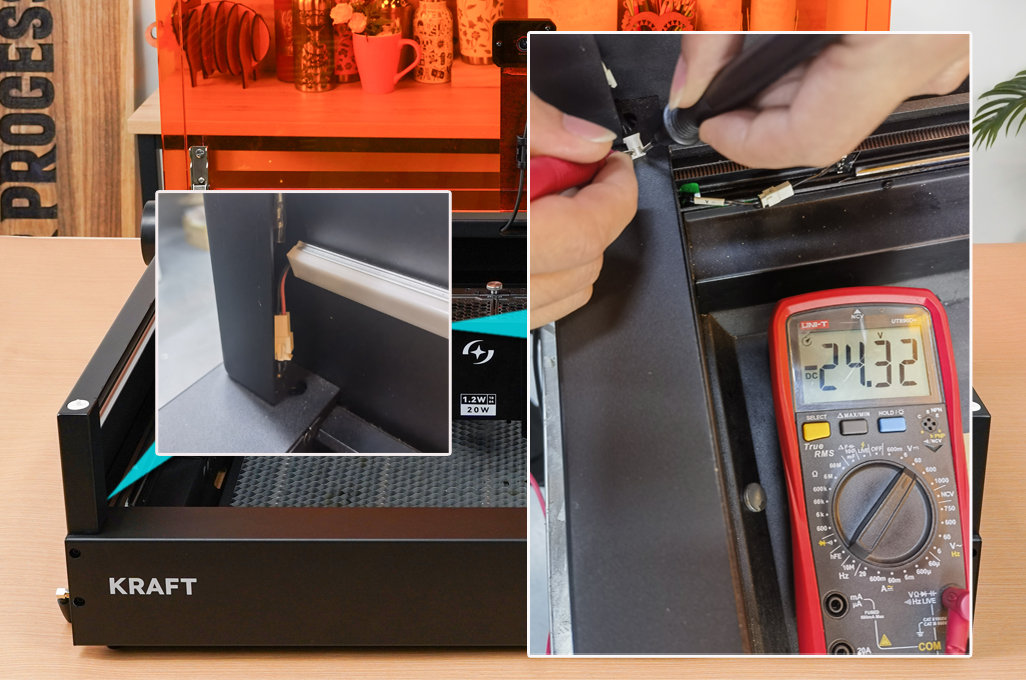
Figure 53
① If the voltage is within the normal range, the LED strip is faulty and needs to be replaced. Refer to the Kraft LED strip replacement video.
② If the measured voltage is 0V, the LED connection cable is faulty and needs to be replaced.
③ If the measured voltage is below 20V, the power adapter may be faulty.
Confirm the fix: With the machine powered on normally, the LED light strip illuminates.
Still not fixed? Contact support with the details listed in What to send support.
Related problems: Power-On Unresponsive · Camera Positioning Off
¶ Repeated Flame Alarms
What you see: The system repeatedly triggers the flame detection alarm.
Check in this order:
-
Confirm whether the engraving material is flammable: check if the material is flammable, such as MDF. If so, false alarms from the flame detection sensor are more likely.
-
Confirm whether the engraving file has dense lines: if the line patterns are very dense, the flame detection is more easily triggered. It is recommended to increase the engraving speed and the number of passes.
-
Test whether engraving other materials triggers the alarm:
① If cutting the same file on plywood does not trigger the alarm, you can disable the flame detection function in AtomStack Studio or the AtomStack App while cutting the current material, as shown in Figure 62. (Note: when this function is disabled, the machine must be supervised at all times to prevent accidents.) Please re-enable this function after engraving is complete.

Figure 62② If the alarm is still triggered when working on plywood, adjust the flame detection sensitivity in LightBurn or LaserGRBL: the command $fire_alarm/overflow_value=15 adjusts the number of trigger counts beyond the threshold; the command $fire_alarm/threshold_value=74 adjusts the flame detection threshold value (shown in Figure 63); a higher value makes it harder to trigger. Note: while these tips can effectively reduce false alarms, they do not replace careful operation. Always closely monitor the machine during operation, as safety should be your top priority.

Figure 63
Still not fixed? Contact support with the details listed in What to send support.
Related problems: Fire Suppression Fails · Smoke Builds Up · Alarm Codes
¶ Air Assist Not Working
What you see: Air assist is not working.
Check in this order:
-
Confirm that the air assist is properly turned on: check if the control knob is turned on; turning clockwise switches it on.
-
Check whether the air pump is vibrating:
① If the air pump is not vibrating, measure the voltage at the Kraft air assist power output port (port 05 as described in the panel function section). The voltage should be between 20V and 24V. If the power supply is normal, the rotary switch board is faulty and needs to be replaced. Refer to the Kraft Air Assist Rotary Switch Replacement Video. If there is no voltage, the mainboard is faulty. Refer to the Kraft Mainboard Replacement Video.
② If the air pump vibrates but there is no airflow, the air pump is faulty and needs to be replaced. Refer to the Kraft Air Pump and Water Pump Replacement Video.
Still not fixed? Contact support with the details listed in What to send support.
Related problems: Yellow, Incomplete Cuts · Smoke Builds Up
¶ Fire Suppression Fails
What you see: The active fire extinguishing device does not respond after the flame alarm is triggered.
Check in this order:
- Check if the fire extinguishing water tank has sufficient water: inspect the water level through the water level window of the fire extinguishing pump.
- Confirm that the active fire suppression function is enabled: verify this in AtomStack Studio software or the AtomStack App, as shown in Figure 64.

Figure 64
- Confirm that the fire suppression device is receiving power: if the fire suppression function is triggered but the water pump does not vibrate or make any noise, measure the voltage at the water pump output port on the Kraft chassis. The voltage should be between 20V and 24V. If the voltage is present, the water pump is faulty and needs replacement, as shown in Figure 65.

Figure 65
Still not fixed? Contact support with the details listed in What to send support.
Related problems: Repeated Flame Alarms · Alarm Codes
¶ Smoke Builds Up
What you see: There is severe smoke inside the enclosure and exhaust performance is very poor.
Check in this order:
- Confirm whether an air purifier is being used: if the purifier's filtering capability is weak, the exhaust will be affected. Try removing the exhaust hose and venting the smoke directly outdoors to check if the enclosure exhaust works normally. If direct venting works, it indicates the purifier's filtering capacity is weak or the filter needs replacement.
- Check if the enclosure fan is clogged with dust: excessive dust accumulation will reduce exhaust efficiency. Refer to the Kraft Enclosure Cleaning Video to clean the enclosure and fan.
- If direct venting and cleaning do not resolve the issue, the fan may be faulty: try replacing the fan. Refer to the Kraft Enclosure Fan Replacement Video.
Still not fixed? Contact support with the details listed in What to send support.
Related problems: Air Assist Not Working · Repeated Flame Alarms